


Lacoste USA: Polo & Sneakers
4.790.00 Reviews
App Specs
- Version
- 1.20.0
- Updated On
- License
- Free
- Downloads
- 50,000+
- Developer
- LACOSTE
- Categories
- Shopping
- Platform
- Android
Screenshots



 Analysis by AppCompare
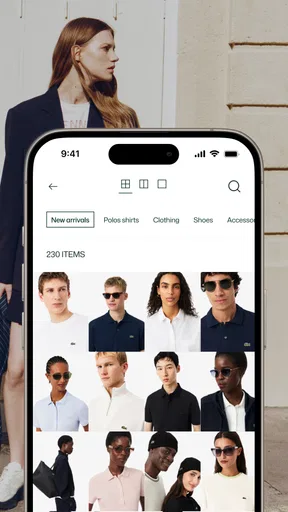
Shopping for clothing on a shared phone can be surprisingly awkward. One person wants to browse polos, another is checking sneakers, and someone else may only be looking for a gift. I found Lacoste USA: Polo & Sneakers most useful in that kind of household situation: it keeps the focus on Lacoste’s own collection instead of mixing products from unrelated sellers, while still leaving room for different tastes and shopping goals.
I approached it as a regular customer rather than as a brand showcase. The app is free, aimed at everyone, and comes from LACOSTE. Its focus is straightforward: explore clothing, footwear, and sportswear through a mobile storefront. That narrow purpose is also its main strength. If I already know I want Lacoste, the app feels more direct than searching through a general marketplace. If I am comparing many brands, however, its value becomes much smaller.
How it works when more than one person uses the phone
A realistic example is a weekend shopping trip. I might open the app to look for a classic polo, while another household member checks sneakers for everyday wear. Rather than passing around a browser with several unrelated tabs, we can use the same catalog as a visual shortlist: each person can point out a color, shape, or style and discuss it before anyone decides to buy.
That shared-device use works best for browsing, not for treating the app as a complete household shopping system. I would not assume that everyone using the same phone has a separate personal area or that the app automatically keeps each person’s preferences apart. The practical boundary is simple: use it together for discovery, then make sure the person responsible for the purchase checks the selected item, size, delivery details, and account context before continuing.
This matters especially when a phone is shared between adults and older children. A child can help choose a sweatshirt or compare sneaker designs without needing to control the purchase. An adult can remain the person who reviews the final basket and handles any account-sensitive step. That arrangement is less about a special family feature and more about sensible coordination around a shopping app.
The safest shared-device habit is to separate browsing from buying. I would let several people explore, but I would pause before any final action and confirm who is signed in, what is selected, and whether the intended recipient is actually the person the item suits.
What I noticed during setup
The app is easy to understand because its purpose is not hidden behind unrelated tools. I can open it with a clear expectation that I am entering a Lacoste shopping environment. The current version is 1.20.0, and it supports devices running Android 9 or later, which makes it accessible on a broad range of phones that are still in everyday use.
Worth Reading Before You Choose

EA SPORTS FC Mobile 26 Is a Bigger Football Game, but It Takes Time

Flipboard Shows What News Apps Must Do Beyond the Feed

Switching to Android Auto Means Rethinking Your Driving Routine

Google Calendar Makes a Crowded Week Easier to Manage

Ludo King Makes the Most of the Minutes Between Plans

Baby Panda World Brings Quick Play to Modern Phones, but Its Game Library Feels Busy
For a shared phone, I would begin by agreeing on a few boundaries. First, decide whether the device is only being used to browse or whether one adult will also use it for account activity. Second, avoid leaving a personal session open if other people regularly use the phone. Third, before placing anything, review the product and recipient together. These are ordinary precautions, but they prevent the most common confusion in a household setting.
I also recommend browsing with a purpose instead of opening the app and scrolling without a plan. One person can look for polos, another can focus on sneakers, and a third can compare sportswear. This makes the app feel more efficient and reduces the chance that a shared session turns into an endless argument over unrelated styles.
The store presence shows a 4.7 average from around 285 ratings, which suggests that many users find the experience satisfactory. I treat that as useful context rather than a guarantee. A high average cannot tell me whether the app fits a particular phone, shopping habit, or household routine. My own judgement is that its simplicity helps first-time users, while shoppers expecting extensive personalization may find the experience more limited.
Coordinating sizes, styles, and decisions
Clothing shopping becomes more complicated when several people are involved because “I like it” is not the same as “it will work.” With this app, I would use separate passes through the catalog. On the first pass, each person identifies possibilities without debating every item. On the second, the household narrows them down by occasion: work, casual use, sport, travel, or a gift.
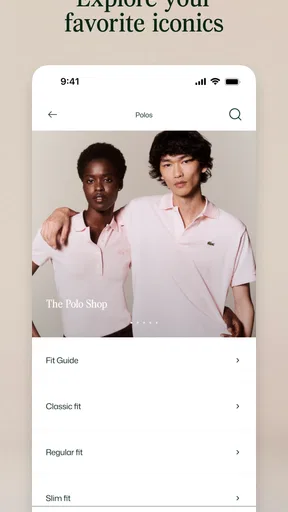
That two-pass approach is particularly useful for Lacoste’s mix of recognizable casual clothing and sportswear. A polo may be chosen for a polished everyday outfit, while sneakers may be judged mainly on how easily they fit into existing clothes. Keeping those decisions separate prevents the familiar mistake of choosing an attractive item that does not match the recipient’s actual wardrobe.
For gifts, I would involve the recipient in style selection but keep the final purchase review with the buyer. This is a good compromise when the recipient is a teenager or when several adults share payment responsibility. The person receiving the item gets a voice, but nobody accidentally commits to the wrong size, color, or category.
Another useful habit is to take notes outside the shopping session. I might write down the preferred product type, color family, and size before handing the phone to someone else. That is more reliable than assuming a shared screen will preserve everyone’s intentions. It also makes the app easier to use when the household is comparing several possible gifts over multiple sessions.
The trade-off is that the app is brand-specific. A general shopping app would make it easier to compare Lacoste with other labels, check a wider range of price points, or combine items from different stores. Lacoste’s own app gives me a cleaner brand-focused experience, but that focus means I need another tool if the decision is really “which brand offers the best alternative?”
Age, trust, and account responsibility
The everyone age rating makes the app approachable for household browsing. In practice, age suitability and purchasing responsibility are different questions. A younger user may be perfectly capable of exploring colors and styles, while an adult should still oversee account details, payment decisions, and the final order process.
I would not hand over a signed-in shopping session without checking what the next screen might involve. Shared phones create a blurred line between casual browsing and personal account access. If one person uses the device for their own shopping, another person should not assume that saved information, order history, or other private details are meant for them to inspect.
This is where trust matters more than technical convenience. The app can support a conversation about what the household wants, but it does not replace clear agreement about who is allowed to buy. For families, that means setting expectations before browsing: children can suggest, teenagers can compare, and the responsible adult confirms the purchase.
I also think the app is better suited to cooperative shopping than unsupervised purchasing by younger users. The catalog itself is not difficult to understand, but clothing decisions involve money, fit, and personal information. A parent or guardian can turn the experience into a useful lesson about choosing deliberately rather than tapping through an attractive product feed.
For adults sharing a device, the concern shifts from age to privacy. I would close the session when finished and avoid assuming that a household phone is automatically a shared account. If two people have different shopping needs, they should coordinate who is browsing and who is managing the purchase, especially when the device is passed around during a trip.
Where the app beats ordinary shopping alternatives
Compared with a web search, the app gives me a more focused route into Lacoste’s collection. I do not have to filter out unrelated sellers or wonder whether a result belongs to the brand’s own shopping environment. That is valuable when authenticity, consistent presentation, and a single-brand wardrobe matter more than broad comparison.
Compared with a general marketplace, the experience is less cluttered. I can discuss polos, sneakers, and sportswear within the same brand context. That makes it a good choice for someone building a coordinated look or buying a gift for a person who already likes Lacoste.
Compared with visiting a physical store, mobile browsing is more convenient for a household that cannot shop at the same time. One person can examine options at home, another can review them later, and the final decision can happen without everyone traveling together. The weakness is that a phone cannot replace trying on clothing or judging materials in person. Anyone uncertain about fit should be more cautious and avoid treating a polished product image as the whole decision.
Compared with a multi-brand fashion app, Lacoste’s app is intentionally narrower. That is either a benefit or a limitation depending on the task. I would choose it when the brand is already the destination. I would choose a broader alternative when I am still deciding between Lacoste, other sportswear labels, and lower-cost options.
Practical ways to get more from the catalog
My first tip is to start with the recipient or use case, not with the most eye-catching item. Ask whether the purchase is for daily wear, a smart-casual outfit, sport, or a present. That simple question helps a shared household avoid selecting something based only on a photograph.
My second tip is to create a short list before asking for opinions. Showing five carefully chosen options is easier for a family than handing over an unlimited catalog. It also encourages useful feedback: one person may prefer a classic look, while another may want something more athletic.
My third tip is to treat sneakers and clothing as separate decisions. Footwear often depends more heavily on comfort, use, and fit, while a polo or sportswear piece may be judged more by styling and versatility. Combining all of those questions in one conversation can make a simple purchase unnecessarily confusing.
My fourth tip is to use the app as a planning tool even when the final purchase happens elsewhere. A household can identify preferred styles in the Lacoste catalog, then decide whether to buy immediately, visit a store, or compare the choice with other retailers. The app remains useful for narrowing taste, even when it is not the only place involved in the decision.
Those workflows reveal an important limitation: this is not a household organizer. I would not expect it to assign tasks, divide budgets, or manage several people’s wardrobes. Its role is shopping discovery. The coordination has to come from the people using the device.
Who should use it, and who should skip it
I recommend it to someone who already knows they want Lacoste and prefers a direct brand-focused shopping experience. It is also a sensible choice for a couple, parent and teenager, or group of housemates who want to browse together before one person completes the purchase.
It suits gift shopping particularly well when the recipient can participate in choosing a general style. A buyer can ask for preferences without revealing every detail, then return later to make the final decision. The app is also a good fit for someone assembling a small coordinated wardrobe rather than hunting through every available brand.
I would skip it if my main goal were the lowest possible price, the widest selection across brands, or a single basket combining products from many retailers. I would also choose a physical store or a broader shopping service when fit is uncertain and trying items on is central to the decision.
People who dislike brand-specific shopping may find the focused catalog restrictive. The app does not need to be bad for that to be true; it simply serves a narrower purpose. Its strongest experience comes when the brand itself is already part of the plan.
My household verdict
Lacoste USA: Polo & Sneakers is a clear, approachable shopping app for exploring Lacoste clothing, footwear, and sportswear. I like it most when the decision is collaborative but the purchase responsibility belongs to one clearly identified person. The shared-device scenario works well for browsing, comparing styles, and preparing a gift, provided everyone respects account boundaries.
Its free access and everyone rating make it easy to introduce to a household, while its focused catalog keeps discussions from becoming as chaotic as they can be on a general marketplace. The compromise is that it cannot provide the breadth, price comparison, or physical fitting experience of broader alternatives.
After using it, my recommendation is simple: choose it when you want Lacoste specifically, and use it as a coordinated discovery space rather than an all-purpose family shopping manager. Keep browsing open to everyone who should participate, keep account and purchase decisions with the responsible adult, and verify the final choice before committing. For that kind of careful household shopping, the app is useful without pretending to solve problems it was not designed to solve.
With over 50K installs and a strong average rating, it has already attracted a meaningful audience, but I would still judge it by the shopping task in front of me. If that task is finding and discussing Lacoste pieces on a phone, it is a worthwhile free option. If the task is comparing the entire fashion market, I would reach for a broader alternative instead.
Pros
- Easy access to Lacoste’s latest clothing
- shoes
- and accessories.
- Detailed product pages help compare sizes
- colors
- and available styles.
- Secure checkout supports a convenient mobile shopping experience.
- Order tracking keeps delivery updates accessible from the app.
- Exclusive promotions may offer savings on selected Lacoste products.
Cons
- Prices can be high compared with similar fashion brands.
- Some popular sizes and colors may sell out quickly.
- Product availability and delivery options depend on your location.
- Returns may require checking specific eligibility and time limits.
- The app is mainly useful for shoppers in the United States.
FAQs for Lacoste USA: Polo & Sneakers
What can I buy through the Lacoste USA: Polo & Sneakers app?
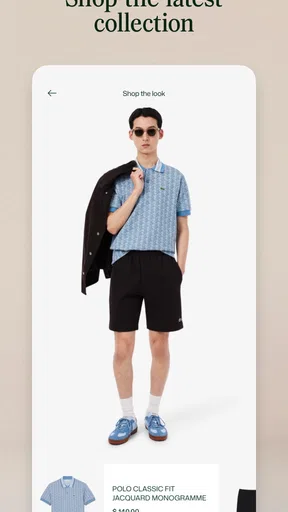
The Lacoste USA app is designed for browsing and shopping the brand’s official collection, including iconic polo shirts, sneakers, clothing, accessories, and seasonal releases. Product pages generally include photos, available colors, sizes, prices, and descriptions. It is useful for checking the latest collections in one place, although availability can vary by size, location, and current stock.
Is the Lacoste USA app free to download and use?
Yes, the Lacoste USA app is generally free to download and use on a compatible Android or iOS device. You can browse products and explore collections without paying for access to the app itself. Costs only apply when you decide to place an order, and the final amount may include shipping, taxes, or other charges shown during checkout.
Do I need an account to shop for Lacoste products?
You may be able to browse the Lacoste catalog without creating an account, which is convenient if you are only comparing polos, sneakers, or accessories. However, an account can make shopping easier by saving personal details, tracking orders, and managing preferences. Depending on the checkout options available in your region, guest purchasing may also be offered.
Can I track orders, returns, and delivery through the app?
The app is intended to support the shopping process after checkout, including access to order information and delivery updates when those services are available for your region. Before purchasing, review the estimated delivery time, shipping fees, and return conditions carefully. Return eligibility, refund timing, and available delivery methods can differ according to the order and location.
Is the Lacoste USA app safe for payments and personal information?
The official Lacoste shopping app is designed to provide a secure environment for browsing and completing purchases, but users should still download it only from a trusted official app store and verify the publisher. Avoid entering payment details through links received in suspicious messages. Before confirming an order, check the website or app address, privacy information, and checkout summary.


